The most common self-tuning mistake isn't a bad value in a table. It's a correct value written into the wrong table.
Modern GM ECMs run two airflow models at once: the MAF sensor's measured airflow, and the speed-density (VE) model's calculated airflow. When fuel trims drift, one of those models is wrong — and the log can tell you which one, if you read it in the right order.
Two Models, One Blend
MAF: measures airflow directly at the sensor. Accurate in steady state, trusted at higher airflow. An intake swap, a different filter, or a blower changes the airflow-vs-frequency relationship the calibration assumes.
VE (speed-density): calculates airflow from RPM, MAP, IAT, and the volumetric efficiency table. This is what the ECM leans on during transients, at low airflow, and as a sanity check against the MAF.
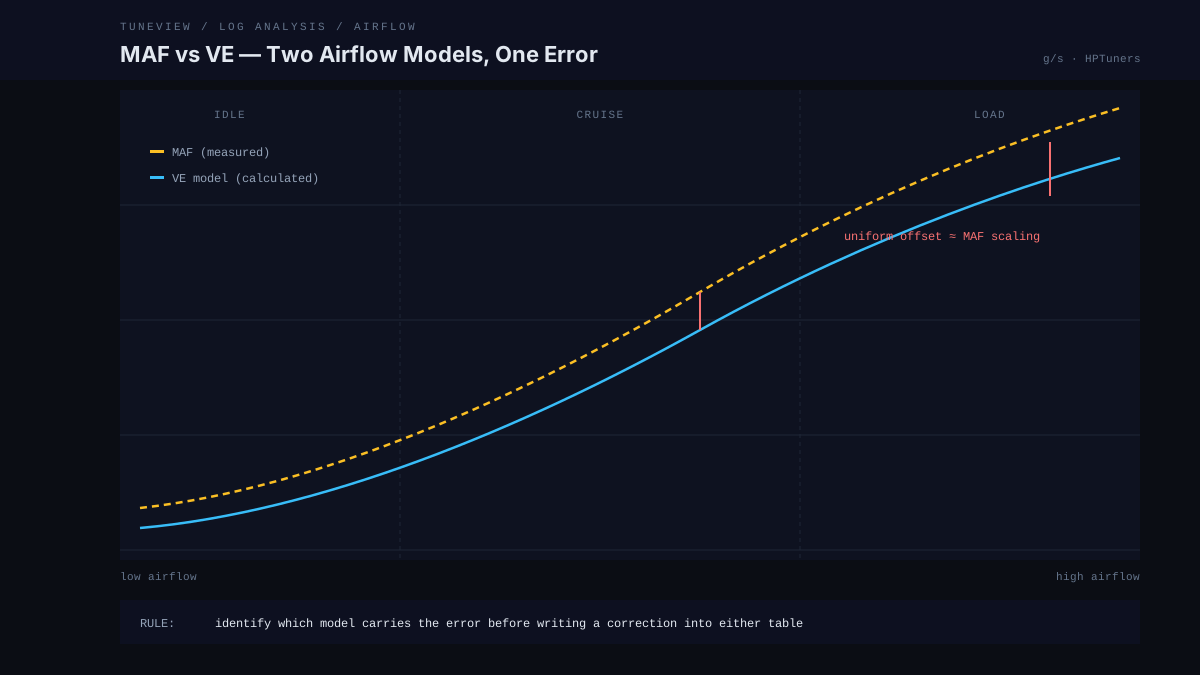
The ECM blends between them depending on operating conditions. That blend is why a MAF error can look like a VE problem in one part of the log and vice versa — and why "just dial the VE table until the trims are flat" often means calibrating the VE table to compensate for a MAF error. Both tables end up wrong, and every future change gets harder to reason about.
Isolating the Error
Step 1: Map the trims against airflow, not time
Don't scan the trim channel chronologically. Sort your mental picture by operating region:
- Idle (low airflow, mostly VE-influenced territory)
- Cruise (moderate airflow, MAF-dominant)
- Higher-load acceleration (high airflow, MAF-dominant)
Step 2: Read the pattern
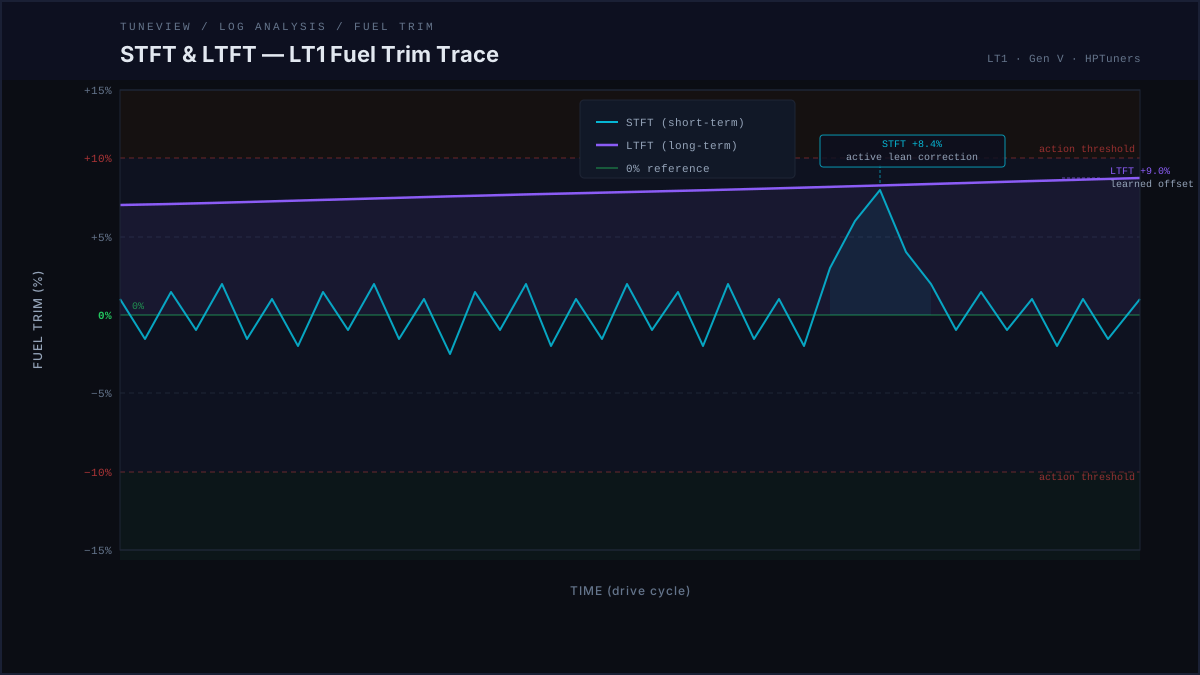
Trims wrong everywhere, roughly the same amount. If LTFT sits at +8% at idle, cruise, and load alike, suspect the MAF curve first — a uniform offset is the signature of a scaling error, and the VE table is unlikely to be wrong by the same amount everywhere.
Trims wrong at idle, clean at cruise. Low airflow error only. Before touching either table: smoke test. A vacuum leak is unmetered air and shows up exactly here. If the engine is sealed, the low-frequency end of the MAF curve and the idle VE region are the candidates.
Trims clean at steady state, spikes on throttle transients. Steady-state models are fine; the transient behavior (and the VE model's role in it) needs attention. Don't rescale the MAF for this.
Trims diverge after a hardware change. Whatever the hardware touched is your suspect. New intake tract = MAF. Cam swap = VE (the pumping behavior changed; the MAF still measures what flows past it).
Step 3: Confirm with an isolation log
The classic technique: force the ECM onto one model at a time.
- Speed-density log: unplug or disable the MAF (or set the fail frequency), let the ECM run pure VE, and log trims. Error now = VE error.
- MAF log: restore the MAF, command open-loop or watch regions where MAF dominates. Error now = MAF error.
Correct the model that's actually wrong, in the cells that are wrong, then bring the second model into agreement with the corrected first.
Step 4: Re-log and verify
After any airflow correction, the follow-up log is not optional. Trims should tighten toward zero in the regions you corrected — and stay clean in the regions you didn't touch. If a correction moved trims in an untouched region, the blend is telling you the error was in the other model.
The Modified-Engine Trap
On heavily modified combinations — big cam, forced induction, ported intake — "normal" trim behavior shifts. A supercharged engine spends more of its life at high airflow where the MAF dominates; a big cam wrecks idle VE assumptions while leaving cruise untouched. Interpreting the pattern requires knowing the build, which is exactly the context a bare trim number doesn't carry.
Seeing This in Your Own Logs
This diagnosis is pattern-matching across channels — trims by operating region, MAF frequency coverage, MAP behavior, and build context. TuneView runs it automatically on every log: it flags whether the error signature points at the MAF curve or the VE table, names the specific regions, and — after you make the correction and re-log — issues a verdict on whether the trims actually tightened.
On a VVE or MAF follow-up, use Copy with Axis in VCM Editor and paste the relevant table into TuneView with the next log. The revision can then compare the finding against the actual grid or curve you are editing. Table-paste instructions.
TuneView is automated log analysis for HPTuners users. GM support is live. Full Tune is $69 one-time for one vehicle/motor, with unlimited analyses and revision rounds and no expiration.